Professional Silent PrintingFor Modern Businesses
Transform your printing workflow with Gloryna Print Agent - the ultimate local printing solution that brings enterprise-grade silent printing capabilities to your Windows environment.
Beautiful Control Center
Modern, intuitive desktop interface for complete control
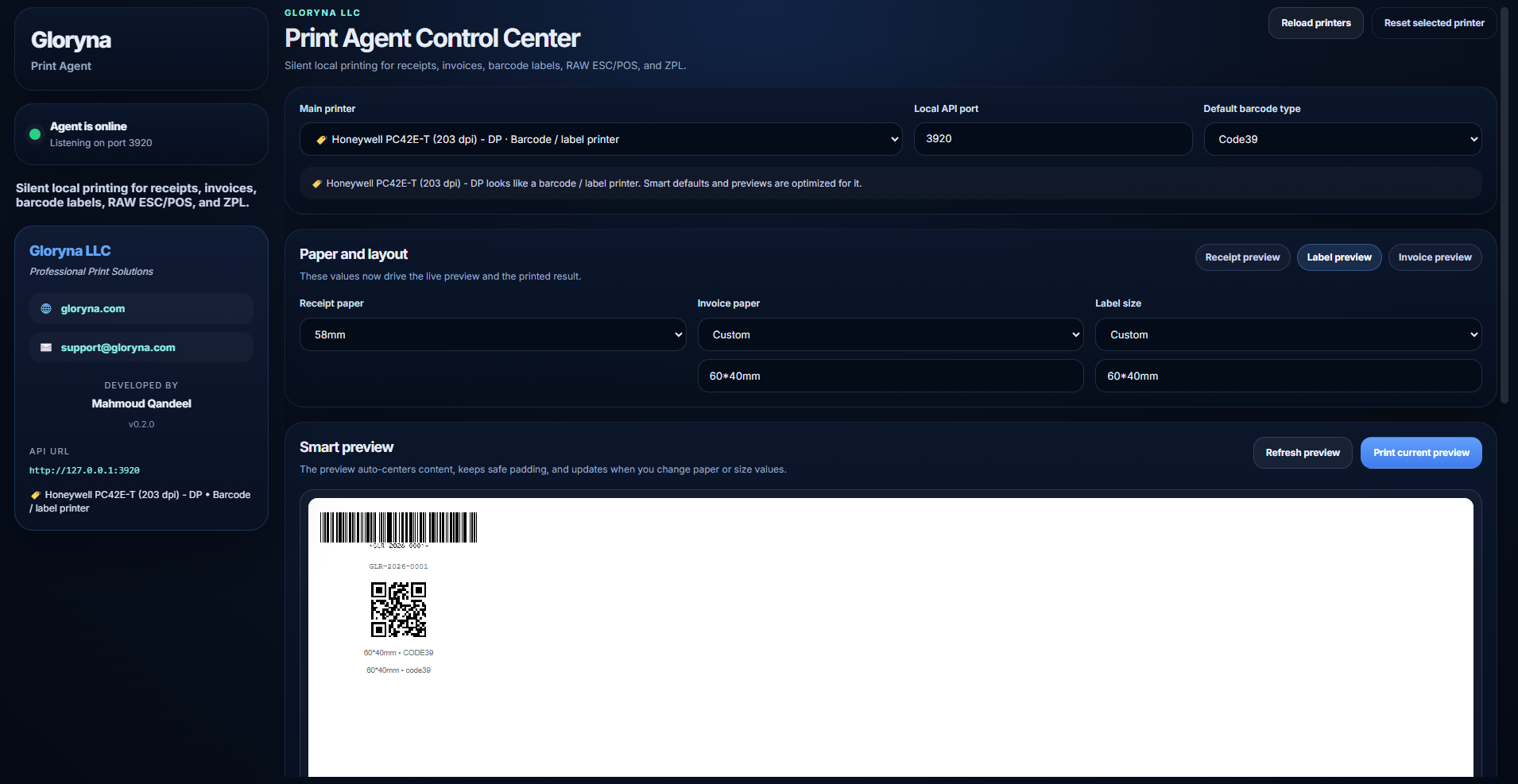
Live Preview
See exactly how your prints will look before sending
Real-time Settings
Change paper sizes and see instant updates
Activity Logs
Monitor all print jobs and events in real-time
Perfect For
E-commerce Platforms
Print shipping labels and invoices automatically
POS Systems
Silent receipt printing without user interaction
Inventory Management
Automated barcode label printing
Restaurant Systems
Kitchen order printing and receipts
Healthcare
Patient labels and prescription printing
Logistics
Shipping labels with ZPL/ESC/POS support
Key Features
Everything you need for professional printing automation
Silent Printing
Print receipts, invoices, labels, and barcodes without any user interaction. No print dialogs, no confirmations - just instant, automated printing.
Smart Layout Engine
Automatically optimizes content for any paper size: 58mm & 80mm thermal receipts, custom label sizes (100×150mm, 60×40mm, 50×25mm), A4/Letter invoices, and dynamic scaling.
Advanced Barcode Support
Generate and print high-quality barcodes: Code128, Code39, EAN-13, EAN-8, UPC-A, QR codes with customizable sizes, custom layouts, and auto-sizing.
RESTful API
Simple HTTP endpoints for easy integration. Print receipts, labels, invoices with just a POST request to http://127.0.0.1:3920
RAW Printing Support
Direct ESC/POS and ZPL printing for specialized hardware. Network printers, USB thermal printers, label printers with full Zebra support, and custom encoding.
Secure & Private
Runs locally with no cloud dependencies. API accessible only from localhost (127.0.0.1), CORS protection, and ASAR encryption for source code security.
Download & Installation
Choose the installation method that works best for you
Full Installer
RecommendedBest for permanent installation
- Installs to Program Files
- Creates Start Menu shortcuts
- Adds Desktop shortcut
- Includes uninstaller
- Auto-starts with Windows (optional)
Portable Version
No InstallationBest for portable use
- No installation required
- Run directly from any folder
- Perfect for USB drives
- Use on multiple computers
- No registry changes
Quick Start Guide
Install & Launch
Download and install using either option above. The application will start automatically and appear in your system tray.
Configure Your Printer
Open Gloryna Print Agent, select your default printer, configure paper sizes (58mm, 80mm, A4, or custom), choose your default barcode type, and click Save.
Test Printing
Click "Print current preview" to test your setup. You should see a sample receipt/label print immediately.
Integrate with Your Application
The API is now running at http://127.0.0.1:3920. Start sending print requests from your web app!
API Endpoints
Simple REST API for seamless integration
/print/receiptReceipt Printing
Print thermal receipts with items, totals, barcodes, and QR codes
/print/labelLabel Printing
Print barcode labels with custom layouts and designs
/print/invoiceInvoice Printing
Print professional A4/Letter invoices with full branding
/print/rawRAW Printing
Send raw ESC/POS or ZPL commands directly to printers
Example: Print a Receipt
const response = await fetch('http://127.0.0.1:3920/print/receipt', {
  method: 'POST',
  headers: { 'Content-Type': 'application/json' },
  body: JSON.stringify({
    title: 'Order Receipt',
    subtitle: 'Thank you for your purchase!',
    items: [
      { name: 'Product A', qty: 2, total: '$50.00' },
      { name: 'Product B', qty: 1, total: '$25.00' }
    ],
    totals: [
      { label: 'Subtotal', value: '$75.00' },
      { label: 'Tax', value: '$7.50' },
      { label: 'Total', value: '$82.50', strong: true }
    ],
    barcodeValue: 'ORDER-12345',
    qrText: 'https://yourstore.com/orders/12345'
  })
});

const result = await response.json();
console.log('Print result:', result);
Real-World Use Cases
E-Commerce Store
Automatically print shipping labels when orders are placed
Silent label printing with tracking numbers and customer addresses
Restaurant POS
Print kitchen orders and customer receipts silently
Multi-printer setup: kitchen orders to kitchen printer, receipts to counter printer
Warehouse Management
Print barcode labels for inventory items
Custom label layouts with SKU barcodes, product names, and prices
Why Choose Gloryna Print Agent?
❌ Without Gloryna
- • Users must click "Print" for every document
- • Browser print dialogs interrupt workflow
- • Inconsistent print layouts across browsers
- • Complex printer configuration
- • No barcode generation
- • Limited customization
✅ With Gloryna
- • 100% silent printing - Zero user interaction
- • Instant printing - No dialogs or confirmations
- • Perfect layouts - Optimized for every paper size
- • Smart defaults - Auto-configured settings
- • Built-in barcodes - Code128, EAN, QR codes
- • Unlimited customization - Full control
Technical Specifications
System Requirements
- OS: Windows 10/11 (64-bit)
- RAM: 100 MB minimum
- Disk: 150 MB free space
- Network: Localhost access (127.0.0.1)
Supported Printers
- • Thermal receipt printers (58mm, 80mm)
- • Label printers (Zebra, Brother, Dymo)
- • Laser/Inkjet printers (A4, Letter)
- • Network printers (TCP/IP)
- • Any Windows-compatible printer
About Gloryna LLC
Leading provider of professional printing solutions, specializing in silent local printing for businesses of all sizes.
Contact & Support
Professional Services
- • Custom integration consulting
- • Enterprise deployment support
- • Custom feature development
- • Training and onboarding
- • Priority technical support
License
MIT License - Free for commercial and personal use
© 2026 Gloryna LLC. All rights reserved.
Get Started Now!
Join thousands of businesses worldwide using Gloryna Print Agent for reliable, silent printing